

Every AI tool I use wants a prompt. That’s fine, but I kept ending up with a /prompts directory growing alongside my code.
I’d already moved away from per-project AI directives in favor of a shared control plane[1] — but that left the question of where prompts live. Most of them are hyper-contextual anyway: one issue, one prompt, one fix. After the task is done, they don’t generalize. They don’t transfer. They served their moment — and that’s it.
So why was I treating them like durable artifacts?
GitHub issues were already the communication channel between the AI Control Plane (AICP)[1] and my projects. That gave me the obvious place for the prompts.
Now I have a pattern:
- I, a user, or the GenAIs themselves author issues
- I do a triage session with AICP and flesh out the issues
- I identify, with suggestions from AICP, the issues to work on next
- AICP develops build prompts for them
- I run:
codex "read CLAUDE.md and implement #28" - After the PR is created, I ask AICP to review the code and, eventually, merge the result and close the issue.
When the issue closes, the prompt closes with it.
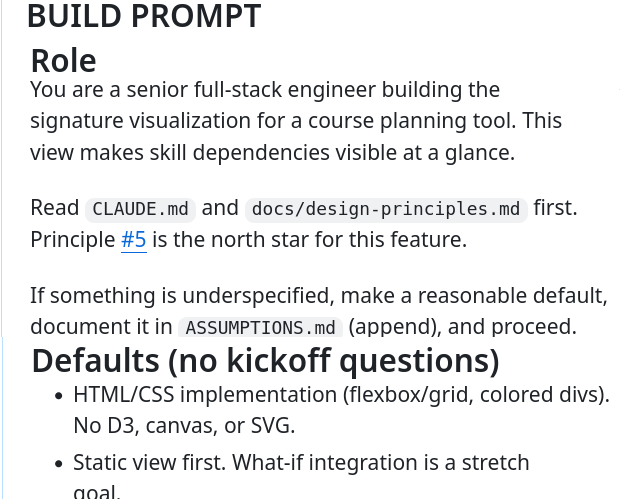 *A `## BUILD PROMPT` comment on [langd0n-classes/course-planner#5](https://github.com/langd0n-classes/course-planner/issues/5)*
I retain the full history — issue body, prompt, PR, outcome — if I ever want to mine it for improvements. But the codebase isn’t getting littered with ephemeral context files.
An example of the prompt creation side:
Create exactly one new GitHub issue comment on <owner/repo>#<N>.

Purpose: produce an execution-ready build prompt for a later coding run.
Do not implement code, open PRs, or change issue state.

Instructions:
1. Read the issue body and comments.
2. Post a NEW comment beginning with `## BUILD PROMPT`.
3. Keep the comment concise and executable with sections:
- Context (1-2 lines)
- Goal
- Constraints
- Phase 0: Research
- Phase 1: Implementation
- Phase 2: Verification Gates
- Phase 3: Deliver
4. In Implementation, include concrete acceptance criteria and likely files/paths.
5. If an older `## BUILD PROMPT` exists, do not edit it; supersede via this new comment.
6. Return only: issue number, comment URL, and exact posted comment text.
And on the project side, wiring the consumption into CLAUDE.md:
## Build Prompt Consumption (Task Mode)

When invoked like `implement #<N>` or `read CLAUDE.md and implement #<N>`:

1. Verify the issue is in THIS repo and OPEN. If not, STOP and report mismatch.
2. Ensure GitHub CLI access:
   - If `gh auth status` fails, run: `source scripts/gh-access-remote.sh`
   - In remote envs, prefix commands with: `export PATH="$HOME/bin:$PATH" &&`
3. Read issue + latest build prompt using `gh api`:
   - Issue body:
     `gh api repos/<owner>/<repo>/issues/<N> --jq '.body'`
   - Latest build prompt comment:
     `gh api repos/<owner>/<repo>/issues/<N>/comments --jq '[.[] | select(.body | startswith("## BUILD PROMPT"))] | last | .body'`
4. If no `## BUILD PROMPT` comment exists, STOP and report.
5. Execute the work using the latest `## BUILD PROMPT` as the task contract, while still obeying this `CLAUDE.md`/`AGENTS.md`.
6. Deliver by opening a PR linked to the issue and posting an issue summary comment with files changed + verification results.

Notes:
- Use `gh api` for this flow (not `gh issue view`).
- Prompt revisions are additive: new `## BUILD PROMPT` comments supersede older ones.
This is the whole workflow — the issue is the ticket, the comment is the prompt, and when the issue closes, the prompt closes with it.
[1]: More on the AI Control Plane (AICP) in a future post.
AI Attribution